One Vulnerability, a Hundred Pipelines, One Board

Twice a month, give or take, the same task lands on my team with a fresh CVE number attached: a high-severity vulnerability in a dependency; patch it everywhere, now. "Everywhere" is close to a hundred microservices, each one a separate GitLab repository with its own pipeline. And "now" does not pause anything else – feature work carries on, because the roadmap doesn't know what a CVE is.
The fixing itself stopped being the hard part a while ago. The hard part is what comes after: watching a hundred pipelines deliver the fix through unstable infrastructure and manual gates, and knowing – not hoping, knowing – that it landed everywhere. Until recently, that knowledge cost a wall of browser tabs and most of a working day.
This post is about the two weekend days that removed the tabs.
The shape of the problem
Some numbers, so the rest of this makes sense.
The system is a large enterprise platform: roughly a hundred microservices under my team's responsibility, each with its own GitLab repository. That separation is an architectural requirement of the project – not mine to change, and not the villain of this story. It has real benefits; it just has a price, and the price is paid in pipelines.
Each pipeline runs nine stages, two to eight jobs per stage. The pipeline infrastructure is shared and heavily loaded, which means jobs sometimes fail for reasons that have nothing to do with the code: a runner timeout, a flaky network moment, an overloaded registry. A failed job in a nine-stage pipeline is not a disaster; it's a retry. But somebody has to see it to retry it.
Then there are the environments: seven of them for different regions and purposes, before we even mention production. Several stages end in manually triggered jobs – deliberate gates in front of specific environments. Deliberate and manual: a human clicks each one.
Now multiply by a hundred repos, twice a month.
The part automation couldn't own
To be fair, most of a security wave is already automated, and AI agents did a lot of the compressing.
The flow we settled on has three phases. First, a developer investigates the vulnerability and develops the fix for each key type of microservice – this is genuinely full-time human work, and no tooling changes that. Second, once the fix is proven on the key types, automation spreads it across the remaining repos. That part scales beautifully.
The third phase is delivery control: making sure a hundred pipelines actually carry the fix through all nine stages, past the unstable-infrastructure roulette, through the manual gates, to the environments that need it. And this is the phase that resisted automation. Not because the tooling was missing, but because the judgement was.
I did try pointing agents at it. I had tools that let an AI agent inspect our pipelines, and they work, but scanning the state of the whole repo list took the agent forty to sixty seconds per pass. Fine for generating a report; useless as a cockpit. Worse, the decisions in this phase are exactly the ones you don't want to delegate: is this failure infrastructure noise or a real problem? Retry, or investigate? Is this environment ready to receive the release, or is another team mid-deployment there? Every answer depends on context that lives in the humans running the wave. The last mile of a security rollout is a human-in-the-loop problem, and the honest response to a human-in-the-loop problem isn't more automation – it's a better instrument for the human.
So the instrument used to be browser tabs. Dozens of them, one per repo, each showing one pipeline, none showing the whole.
Every alternative had a gatekeeper
Here's where working inside a big corporation shapes the engineering more than any framework choice ever could. Before building anything, I did look at what already exists, and everything I found failed on one of two axes: it couldn't act, or it couldn't be adopted without a fight.
GitLab's own multi-project dashboards. The Operations and Environments dashboards genuinely show pipelines across projects, but for private repositories they sit behind the Premium and Ultimate tiers, and they are strictly informational. You can watch a pipeline turn red on them; you cannot retry, cancel, or trigger anything from them. For a workflow whose entire point is to see it, act on it, a read-only view doesn't remove the tabs – it adds one more. And a licence-tier upgrade in a corporation is procurement wearing a different hat: a budget to fight for, a justification to write, months to wait.
The official CLI, glab. A genuinely good tool, for one repo at a time. It's single-repo by design, so pointing it at a hundred repos means writing custom shell wrappers around sequential calls. That's a dashboard with extra steps and no screen.
Community dashboards. Open-source GitLab pipeline boards exist, but nearly all of them are passive radiators, built to glow on a wall-mounted TV, not to be worked in. Interactive multi-repo control – batch retries, cancels, kicking off manual gate jobs – is largely absent from the whole category.
A commercial product. Even if one matched the workflow exactly, adoption dies on the approval path. In an environment with strict security requirements, a new vendor means an assessment, dependencies to check and register, a review with no guaranteed outcome, and calendar time measured in months. All for a tool I couldn't be sure would fit.
Restructuring the architecture – fewer repos, a monorepo, anything of that sort – was never on the table. It's a requirement, and honestly, requirements that survive contact with a hundred services usually have reasons.
In a large organisation, the real price of a tool is not its licence – it's the approval path. Which inverts the design question in an interesting way. The problem wasn't "what's the best pipeline dashboard?" It was: what is the most useful tool that requires nobody's permission to exist?
Scoped to need no permission
That question has a surprisingly precise answer, and every headline decision in CI Deck falls out of it.
Local only. It's a process on my machine, bound to 127.0.0.1. No server to request, no deployment to register, no new place where data accumulates.
Zero runtime dependencies. It runs on Bun, and Bun's own HTTP server, SQLite, and bundler do all the work. There is no dependency tree to audit, because there is no dependency tree. In a team that patches other people's dependency trees a couple of times a month, this was less an aesthetic and more a professional courtesy to my future self.
It talks only to GitLab. The only credential it holds is your personal access token (the same one you'd use in a terminal), verified against GitLab before it's stored, kept in the OS credential store where one exists, and never sent anywhere but the GitLab host it was saved for.
Nothing leaves the machine. The watch list and settings live in a local SQLite file. There's no telemetry, no account, no cloud.
Each of these is a technical decision, but notice that each is also an adoption decision. A local, zero-dependency, loopback-bound tool that holds your own token and talks to a system you already have access to introduces no new trust relationship. There is simply nothing for the corporate machinery to catch, because nothing new crosses any boundary. My teammates didn't file a request to start using it. They ran it.
It slotted straight into the team workspace we already had (the meta-repo pattern I've written up here) as one more local tool next to the code it watches.
A weekend, honestly
The git history is public, so I'll say exactly what it says: the first release – the board, the backend, the release pipeline – took one weekend. A second iteration followed the week after: Docker images, standalone executables, UI polish. That's the whole budget so far, and it's the point: against months of procurement with no guaranteed result, a weekend of building is not the reckless option. It's the cheap one.
The tool has an explicit threat model. There is deliberately no authentication on the local port – anyone who can reach loopback on your machine is already inside the trust boundary, and pretending otherwise would be theatre. What the server does defend against is the attack that actually applies to local tools: a malicious web page reaching your loopback, so every request passes Host, Origin, and Sec-Fetch-Site checks against DNS rebinding and cross-site writes. And where the OS offers no credential store, the token sits in the database in plain text, with the UI saying so out loud. Because encrypting data with a key the app can derive on its own is obfuscation, not protection, and I'd rather tell you the truth than sell you a lock drawn on a door.
The releases are built not to require trust either: published from CI over OIDC trusted publishing with no long-lived token in the repository, provenance attestations on the package, the standalone executables, and the container images, and every CI action pinned to a commit SHA. A tool for people who patch supply-chain vulnerabilities should not itself be a supply-chain leap of faith.
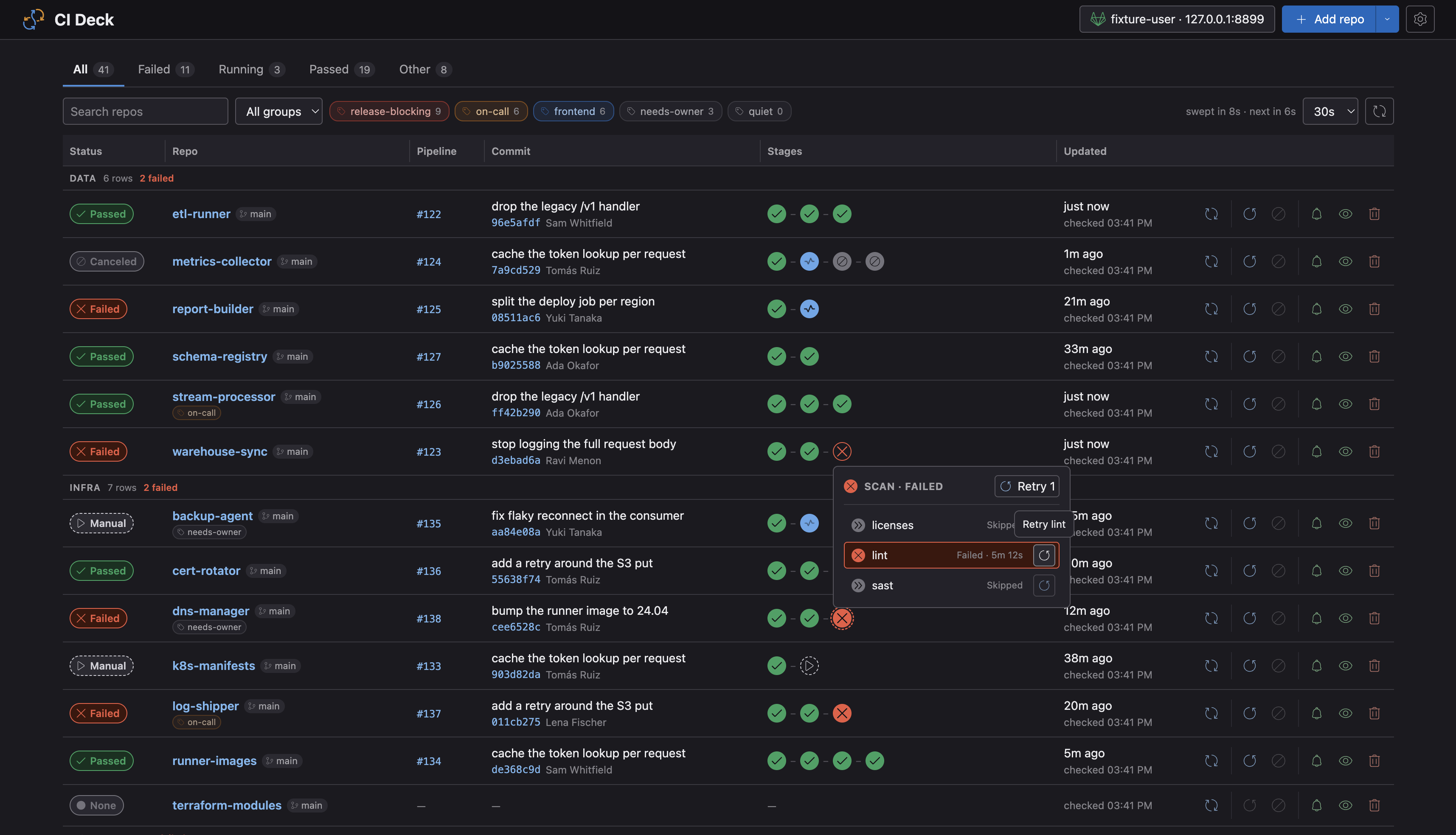
The result is one board: every repo you care about, on the branches you care about, its most recent pipeline as a row – status, stages, failed jobs on hover – with the controls that matter: retry, cancel, and start manual jobs, right there.
What changed
I won't pretend I ran a measured before-and-after study. Here is what I can honestly report.
The question a security wave used to end with – is the fix delivered everywhere, or is something stuck? – is now answered by looking at one screen for about a second. Red rows are the work; everything else is done. During a wave, I keep the board open and act on failures as they surface, instead of patrolling tabs to discover them.
The manual gates went from the worst part to a non-event. Kicking off dozens of gate jobs across repos used to be tab archaeology: find the repo, find the pipeline, find the stage, find the button. Now it's a series of clicks on one board.
My teammates adopted it without ceremony, and not only for security waves. Ordinary feature work here almost always spans several services, so "watching several pipelines at once" is just what a regular day looks like.
And one consequence I didn't design for but should have seen coming: the AI agents got faster too. The same pipeline-control tools that used to spend a minute or more scanning the repo list now ask the locally running CI Deck and get the full current state instantly. One tool, two customers: the developer and the agent, reading the same board. In an AI-native workspace, that's what a good instrument looks like – it doesn't compete with the automation; it feeds it.
The seam
If there's a transferable lesson in this, it's about where the tool went, not what it's made of.
Automation compressed our security waves from every side – investigation assisted by agents, propagation fully automated. What remained was a seam: the stretch of the process where judgement is the work and a human has to stay in the loop. The instinct in 2026 is to attack such seams with more automation. Sometimes that's right. But sometimes the seam is load-bearing, and the correct move is to give the human standing in it a dramatically better instrument – one scoped so tightly to the seam that it costs a weekend to build and nobody's permission to run.
CI Deck is open source under Apache-2.0: github.com/ivanbaha/ci-deck. If you live in GitLab across more repos than fit in your head, it's bunx ci-deck away – no config, no account, no server. Add your repos and see them all at once.
Every few weeks, the message still lands. The tabs don't open anymore.